CFFA1: Difference between revisions
No edit summary |
No edit summary |
||
| (8 intermediate revisions by the same user not shown) | |||
| Line 17: | Line 17: | ||
==DIP Switch Settings== | ==DIP Switch Settings== | ||
The DIP Switch is located at the upper RIGHT corner of the card, and is designated "S1".<br> | The DIP Switch is located at the upper RIGHT corner of the card, and is designated "S1".<br> | ||
The default setting for the | '''The default setting for the Replica1 is: 1-OFF, 2-ON, 3-OFF, 4-6-ON.''' | ||
* S1-1: Unused. Can be in any position. | * S1-1: Unused. Can be in any position. | ||
| Line 30: | Line 30: | ||
* S1-6: Reset Enable. Factory Default: jumper installed. Connects Apple bus reset signal to CF device reset. I recommend leaving this jumper in. | * S1-6: Reset Enable. Factory Default: jumper installed. Connects Apple bus reset signal to CF device reset. I recommend leaving this jumper in. | ||
== Firmware Upgrade == | |||
The firmware for the CFFA1 is user upgradeable, and is simple and easy to do. Please review the "CFFA1 Firmware 1.2 Release Notes" below to start with. Either of the CF Card images has the newest firmware on it, as well as the latest version of the Ultimate Apple1 User Image. Once you have restored the CF Card image you can load and run the firmware updater program. '''Be sure DIP Switch 4 is UP/ON so you can write to the ROM.''' If the switch is DOWN/OFF the ROM is write protected. | |||
== Downloadable Files == | |||
<div class="new_window"> | |||
<gallery class="center" widths=150px heights=80> | |||
File:PDF_ICON.svg|User Manual v1.1 for CFFA1 v1.0 RevD|link=https://wiki.reactivemicro.com/images/0/0d/CFFA1_Manual_1.1.pdf | |||
File:PDF_ICON.svg|Quick Start Instructions - 2023-02-27|link=https://wiki.reactivemicro.com/images/9/9c/2023-11-13_-_CFFA1_-_Handout.pdf | |||
File:PDF_ICON.svg|CFFA1 Firmware 1.2 Release Notes|link=https://wiki.reactivemicro.com/images/6/65/Release_Notes_v1.2.txt | |||
File:Floppy_Icon_312.svg|128MB CF Card Image, Ultimate Apple1 v3.3 User Image Plus v1.2 Firmware and Loader/Upgrader|link=https://wiki.reactivemicro.com/images/d/d6/2026-10-11_-_CFFA1_128MB_-_UA1_User_Image.imgc | |||
File:Floppy_Icon_312.svg|32MB .PO Image, Ultimate Apple1 v3.3 User Image Plus v1.2 Firmware and Loader/Upgrader|link=https://wiki.reactivemicro.com/images/7/7b/2026-10-11_-_CFFA1_-_CF_Distro_-_UA1_CFFA_v3.3.po | |||
</gallery> | |||
</div> | |||
The "128MB CF Card Image" (.IMGC) image uses [http://hddguru.com/software/HDD-Raw-Copy-Tool/ HDDRawCopy v1.10] to restore directly to a 128MB or large CF Card. The .PO image uses CiderPress and you might need to partition the CF Card first before restoring. | |||
[[Category:Hardware]] | |||
[[Category:Apple]] | |||
Latest revision as of 21:58, 16 October 2026
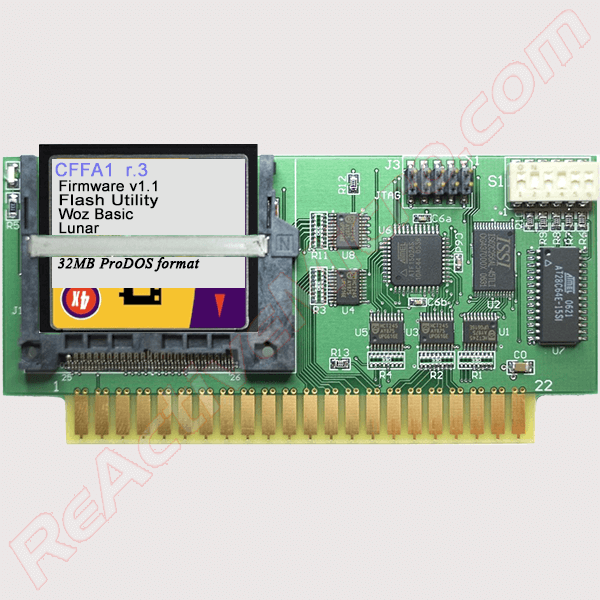
The CFFA1 is mass storage controller card for the Apple 1 and its clones. R&D Automation has designed the card to interface with the expansion slot on the Apple 1 motherboard. The CFFA1 allows access and storage of files on CF media via simple menu driven interface.
Product Status: Actively sold by Manila Gear and ReActiveMicro.
Support: Post on the Discussion page (link above) or email ReActiveMicro Support.
Sales: Visit the ReActiveMicro Store.
History
The CFFA1 was created by R&D Automation and released for sale in March of 2007. On November 10, 2023 ReActiveMicro officially announced the addition of the CFFA1 to the RM Store.
DIP Switch Settings
The DIP Switch is located at the upper RIGHT corner of the card, and is designated "S1".
The default setting for the Replica1 is: 1-OFF, 2-ON, 3-OFF, 4-6-ON.
* S1-1: Unused. Can be in any position.
* S1-2: Set switch to ON to disable response from the onboard SRAM in the address range of $1000 to $7FFF. This is useful if you are using a Replica1 computer, which already provides SRAM in this address range. Leaving this switch OFF on a Replica1 or any host system with RAM in this address range will result in a bus fight and unpredictable computer operation.
* S1-3: Set switch to ON to set pin19 of the CPLD to a logic 0. This pin is currently unused. But may be used in future release of CPLD logic firmware.
* S1-4: EEPROM Write Enable. When set to OFF, this switch prevents accidental and intentional writes to the EEPROM. Always leave this switch in the OFF position until you want to change the EEPROM contents.
* S1-5: Set switch to ON to enable the 32KB SRAM. This SRAM is mapped into the host computer at $1000 to $8FFF. This cannot be changed without reprogramming the CPLD. You can however prevent the SRAM from responding to addresses $1000 to $7FFF using S1-2. This is useful if you are using a Replica1 computer. Note: the Menu firmware developed for the CFFA1 needs RAM to exist from addresses $8000 to $8FFF on the host computer. If your host computer already has this RAM then disable the CFFA1‟s onboard SRAM by switching this switch OFF.
* S1-6: Reset Enable. Factory Default: jumper installed. Connects Apple bus reset signal to CF device reset. I recommend leaving this jumper in.
Firmware Upgrade
The firmware for the CFFA1 is user upgradeable, and is simple and easy to do. Please review the "CFFA1 Firmware 1.2 Release Notes" below to start with. Either of the CF Card images has the newest firmware on it, as well as the latest version of the Ultimate Apple1 User Image. Once you have restored the CF Card image you can load and run the firmware updater program. Be sure DIP Switch 4 is UP/ON so you can write to the ROM. If the switch is DOWN/OFF the ROM is write protected.
Downloadable Files
-
 User Manual v1.1 for CFFA1 v1.0 RevD
 -
Quick Start Instructions - 2023-02-27
-
CFFA1 Firmware 1.2 Release Notes
-
 128MB CF Card Image, Ultimate Apple1 v3.3 User Image Plus v1.2 Firmware and Loader/Upgrader
 -
32MB .PO Image, Ultimate Apple1 v3.3 User Image Plus v1.2 Firmware and Loader/Upgrader


The "128MB CF Card Image" (.IMGC) image uses HDDRawCopy v1.10 to restore directly to a 128MB or large CF Card. The .PO image uses CiderPress and you might need to partition the CF Card first before restoring.